Why Is My Charger Not Recognized by the Device?
Charging a phone, tablet, or laptop is a routine task, but it can be frustrating when your device refuses to recognize the charger. This problem can arise from a variety of causes, ranging from physical damage to software glitches or compatibility issues. Often, users feel unsure whether the issue lies with the device, the cable, or the power adapter. Understanding the different factors that affect charging recognition helps in solving the problem efficiently. In this article, we will explore practical steps and considerations to restore a reliable charging connection.
Check the Physical Connection and Hardware
The first step is to carefully inspect the physical connections between the charger and your device. Look for visible signs of damage on the cable, such as fraying, kinks, or exposed wires. Examine the charging port on your device to ensure it is free from dust, lint, or corrosion that might interfere with the connection. Gently plugging and unplugging the cable can sometimes reveal a loose or bent connector that prevents proper recognition. Paying attention to these simple physical checks often resolves common charging issues without requiring any technical tools.
Test with Alternative Components
Try a Different Cable or Power Adapter
Sometimes the cable itself is the culprit rather than the charger or device. Testing with a different, certified cable can quickly determine if the original cable is faulty. Similarly, swapping the power adapter with another compatible one helps isolate whether the issue lies with the charger. It is best to use high-quality cables and adapters designed for your device, as low-quality accessories may not support proper communication for fast charging. Ensuring the components are fully functional is a straightforward step that prevents unnecessary device servicing.
Test Your Charger on Another Device
If the cable and adapter appear fine, try using the charger with a different device. If the new device recognizes it without issues, the problem may be specific to the original device. Conversely, if neither device responds, the charger itself could be defective. This method of cross-testing helps pinpoint the exact source of the problem and informs your next steps. It also prevents wasting time troubleshooting the device when the actual issue is elsewhere.
Address Software and Power Issues
Restart Your Device to Clear Glitches
Electronic devices can sometimes experience temporary glitches that prevent charging recognition. Restarting your device can clear these minor software conflicts and reset the charging system. It is a simple step that often resolves issues without further intervention. Additionally, performing a restart periodically can maintain smooth performance and reliable charging. This practice is a practical first response to troubleshooting charging errors.
Check for Software Updates and Battery Health
Keeping your device software updated ensures compatibility with modern chargers and fast-charging protocols. Manufacturers frequently release updates that improve charging efficiency and resolve recognition problems. Additionally, checking the battery health status can reveal whether degraded batteries are affecting charging functionality. Devices with aging batteries might struggle to communicate properly with chargers, which can appear as a recognition error. Staying current with software and monitoring battery health is essential for consistent charging performance.
See also: How Wearable Technology Is Influencing Healthcare and Fitness
Identify Compatibility Problems
Verify Certification for Fast Charging Protocols
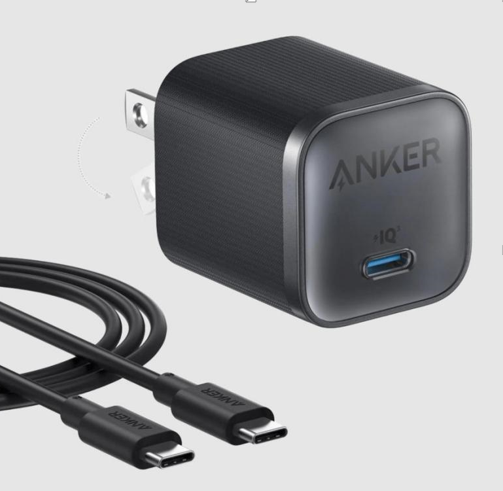
Some devices require chargers that support specific fast-charging standards such as Power Delivery (PD) or Quick Charge. Using a charger without the appropriate certification may result in the device refusing to recognize it or charging slowly. A high-quality Anker usb fast charger ensures compatibility with most devices while providing safe, efficient power delivery. This type of charger acts as a reliable solution for users who want consistent recognition and fast charging without worrying about protocol mismatches. Choosing certified accessories eliminates one of the most common causes of charging errors.

Understand Power Requirements for Larger Devices
Larger devices, such as tablets or laptops, often demand higher voltage or current than standard chargers provide. Using a charger that cannot meet these requirements may cause the device to show a “not recognized” error. Checking the power rating on both the device and the charger helps ensure proper compatibility. Matching the voltage and amperage ensures that your device receives the correct amount of power. Understanding these specifications prevents repeated recognition errors and protects your device from potential damage.
When to Seek Professional Help?
Signs of Internal Hardware Failure
If your device continues to fail in recognizing multiple chargers and cables, internal hardware issues may be the cause. Problems like damaged charging ports, worn-out connectors, or faulty internal circuits require professional assessment. Attempting to repair these components without experience can worsen the damage. Technicians can diagnose and fix these issues safely, restoring reliable charging functionality. Recognizing the limits of DIY troubleshooting ensures that your device receives proper care.
Persistent Connection Issues After Troubleshooting
When all common troubleshooting steps fail, persistent connection problems indicate deeper issues. Even with functional cables, adapters, and updated software, an unresponsive charging port or internal controller may require professional intervention. Timely servicing prevents additional damage and reduces the risk of complete battery failure. Monitoring your device for early signs of persistent errors helps avoid major repairs later. Being proactive about recurring charging problems is key to maintaining device longevity.
Conclusion Charger recognition issues often arise from physical damage, software glitches, or compatibility limits. While a methodical approach—inspecting hardware, testing components, and updating software—can resolve most problems, the true solution lies in understanding and choice. Opting for certified, high-performance accessories, such as an Anker USB fast charger, transcends mere functionality. It becomes an investment in predictability, transforming a daily necessity from a source of frustration into a gesture of care for your devices and your own peace of mind.